Twenty years ago, the idea that your phone would be a constant companion nearly anywhere you might go, and that it would also be your camera, well it was only a futuristic dream. Fast forward to a recent camera clubs' convention in Niagara Falls, and cell photo photography was a hot topic where the discussion included how it can be a tool for a new style of creative photography. Change is indeed the only constant, and it is accelerating.
Niagara Falls is, of course, an iconic landscape. I took some of my free time to further my understanding of what the iPhone camera can do with some understanding of its limitations and attention to traditional wide angle photography. After all, the best camera is the one you have, and I always seem to have my iPhone with me.
My first outing was before sunrise along the American side of the falls. This was a test of the ProHDR app where the only light was the incident light from street lights. I'd put together a bracket to hold my iPhone on a tripod (using rubber bands no less). Also, I had learned that the volume control button on my ear buds' cord would operate as a remote release. So, how did it do?
Well, I would say fair. It was a very foggy morning so light was very minimal. Looking at the pixels, there was a lot of color noise. The ProHDR did handle the bright tones nicely but dark areas were very noisy. The app only produces a 640x480 pixel image. On the positive side, the tree branches are sharp, so I was encouraged that the remote release and makeshift tripod mount were sufficient. I'd just like more pixels and less noise.
I moved on to the falls overlook as civil dawn came. The view of
the falls can be a little "trashy" if the wide angle view includes a
lot of the high rise hotels and such, so I worked to distill the image
down to just the precipice of the falls. As light built before actual sunrise, the HDR Pro began to pick up the foreground tones better.
This was encouraging, but as other photographers from the convention arrived, I thought the light was becoming harsh, and I knew that I was hungry so I reserved the rest of my testing for the following morning when no fog was expected.
Again arriving early on the next morning, I headed across the foot bridge to Goat Island. To my surprise, a busload of Asian visitors were already there, but I found an overlook delightfully deserted, and again set up my iPhone, this time without a tripod but using the railing as a support. No HDR used for this image. The meta data says the following image was 1/20 second, f2.8 at ISO 80. I again used the remote release on the ear bud cord. I think this is a critical improvement that avoids blurry results. I've found it difficult to see if the picture is really sharp on the iPhone, so good technique is required to avoid disappointment when you get the photo ready to display on anything other than a cell phone.
I did post-process this a little in Lightroom. I reduced exposure -0.18 ev, increased contrast modestly and reduced luminance noise a small amount too. Overall, I was pleased with this image from a cell phone camera. I could easily print a 5x7 inches image with this file. As a means of calibrating this result, I also shot a few D300s images that morning. The following is a DSLR image for comparison.
Is the DSLR image better? Surely. After all, I had control of aperture, ISO speed, and focal length plus the ability to review the exposure on a histogram. All of these are benefits of the added size and weight. Still, with a steady support and knowledge of wide angle photography, the cell phone camera came very close.
What is next? I'll next experiment with making panoramic photos with the Dermander app.
Showing posts with label cell camera. Show all posts
Tuesday, March 20, 2012
Monday, March 12, 2012
A Delight- US Botanic Garden
The Botanic Garden is best known for their conservatory near the US Capital on the Mall. The clearest recollection I have of my first visit to Washington as young boy is the conservatory and the wonderful orchids. That was nearly sixty years ago. So, visiting their green houses was greatly anticipated.
As we entered, the staff was clearly excited to have this opportunity to show off their facility from the sophisticated climate control to the wondrous collection of flora. Perhaps my boyhood recollections of the orchids most strongly directed me to the orchid area. This is where all of the real work occurs to deliver a beautifully flowering plant to the conservatory.
We were quickly welcomed by Clive Atyeo, one of their many expert gardeners. The time melted away as our host shared so many details of the nurturing that goes into the orchids.
These are master gardeners who expertly optimize temperature, sunlight, humidity and nutrients in a clean environment with amazing results. I realized later that I had failed to write the names of the orchids in my notes, so you'll have to forgive me for not being able to include the proper names of the blooms. Just enjoy, as we did.
This is one of the Lady Slipper orchids, probably of the Cypripedium genus. I was taken by the small size of the bloom compared to the wild Cypripedium acaule that I love to find in the New York woodlands. In addition to the beauty of orchids, the range of sizes amazes me as they can be as small as a pea or as large as a softball.
Those who know me would expect I carried a large photo pack, with advanced digital SLR camera, tripod and multiple lenses, but that was not the case for this day. I continued my quest to use the iPhone camera when possible, and only backed that up with a Canon G9 point and shoot. So, let's just continue with photos that record the wonders of the Botanic Garden. I'll caption those with the iPhone. All images have minimal editing.
Here are three images that show some of the variety in bloom arrangement and size.
![]() | |||
| Canon G9 |
![]() |
| iPhone |
![]() |
| Canon G9 |
![]() |
| iPhone |
There are also varieties that produce large clusters of flowers. Wonderful to see in many different colors.
![]() |
| iPhone |
There were other beautiful flowers and succulents, such as this cactus and yes, Amaryllis, unlike what I have seen in the flower shops.
![]() |
| iPhone |
![]() |
| iPhone |
Paul Schmitt
Postscript for the photographer
If you are following the differences between iPhone and G9 photos, there are lessons about what each can do, and what it's best to avoid. First, the size of the iPhone allows you to get into very low or odd positions not possible with a bigger camera. That is a plus. Since the iPhone lens has a very wide angle lens, it is key to look at the background as much as the subject. If it is cluttered away from the subject, then the G9 with the zoom lens can crop out the background. If the iPhone can get close and show no background, it works. However, then you must also check that you are not too close to focus. So, to isolate a subject, the point and shoot still has the advantage. I also found that I rejected many iPhone photos because the sunny day created very bright areas that the wide angle lens included. The light burned out the pixels. Best to work in the shade or on cloudy days. Since you cannot adjust the exposure manually to compensate for over-exposure, the exposure adjustments on the point and shoot win the day. Still, it is fun to see what the iPhone can do, and sometimes it will be the only camera to have with you.
Thursday, March 8, 2012
iPhone photos- Can they be creative?
When a leaky zip lock bag proved to be the undoing of my cell phone in August 2011, I made the leap from a very basic cell phone to an iPhone. I was wading in a river with my camera on an inner tube float and my cell safely protected by a zip lock bag, or so I thought. It got very wet. So, I went from saying "it is just a phone" to saying it was my link for checking weather radar and getting birder updates on where to find the best birding. I had not included the camera in the iPhone as part of my decision. That would change.
The change in my opinion began one afternoon when I was wandering through the herb garden at Cornell Plantations. The light was good, and I had been lazy. My DSLR was not with me. I decided to "play" with the iPhone camera just as when I experimented with a Holga toy camera. It had a single element, uncoated plastic lens. There were two aperture settings, one shutter speed and no meter. Basic. Very basic.
Now, the iPhone is a bit like the Holga too. There is one aperture, f/2.8. Since the lens is very wide angle, there is a large depth of field. Correct exposure is dependent on the automatic metering to set shutter speed. This makes for a good test of the photographer's basic skill set and understanding of wide angle photography.
My first images surprised me. Was this capable of more than snapshots? I immediately saw the first challenge, namely holding the iPhone so my fingers did not get into the image. In addition, I was so close to the subject that it was easy to shade the subjects. Those are good basic skills to keep in mind.
A next question to me was about the wider landscape image. Could I use the wide angle to show a perspective of flower beds and their surroundings?
I found the size of the iPhone made it easy to hold it in unusual positions and see the result on the image screen.
This image would have been better if I had a short stool to stand on, but I loved the color, and the instant review of the photo. The colors were looking pretty good too. This image was at 1/125 second and ISO 100, naturally at f/2.8. The previous image was at 1/120 second, ISO 80. I was surprised that the sensor ISO speed went down to 80.
So, I went looking for some more images. If you are photographer, you know how a few good images inspires a burst of creativity with no apparent sense of time passing.
The images kept coming as I awakened to the possibility of a creative camera that is so small and as ever present as a cell phone.
Parallel to this discovery was the delight I felt when I could pull the image I just made into a photo editing application, and make some simple adjustments. If you can remember shooting a roll of slide film, mailing it to a processor and waiting for the return mail some week later, then this is revolutionary beyond the initial digital revolution when you could download a memory card to your computer the same day and edit. Now you can do edit and email it to someone within minutes, and it can be a pretty good image.
Here is a good example of how the iPhone can capture an unexpected creative image. We were visiting our daughter in Washington, DC this autumn and with some unexpected time, headed across the Mall to see the new monument to Martin Luther King Jr.
In the interest of honesty, this is a digital composite. The sky was a dull and uniform grey, so the sky is added. My point is that I was able to capture the critical image data and create an artistic and reasonable image to express the feelings I had at this sculpture.
Just this past week, I was feeling cabin fever after a day of pouring rain, and went in search of images with both my iPhone and Canon G9 point and shoot. I wanted to compare the two cameras critically.
I think this is a pretty good image. It was made with the camera very low to the pavement in order to correctly position the reflections. Which camera would you expect to have created this landscape image?
So, after deciding on the source of the landscape image, decide which camera likely made the portrait image at that follows. It is in the same light.
Well, the first image is from the iPhone. The tipping of the Corning clock tower and the bank building suggest a wide angle shot with the lens tipped upward. This causes keystoning. The second image uses a longer focal length to limit the portion of the scene in the image. There is less keystoning. The colors are pretty good in both with a slight edge on my screen to the G9, a very slight edge.
I asked the question whether the iPhone is capable of creative photograph, and I think the answer is a qualified yes. It works where wide angle distortions are not a problem. (Note that the one common complaint is that people's faces are distorted to look bloated and warped. That is to be expected from a wide angle lens.) I do think it is important to get close to a foreground element that can fill the image. Objects in the distance become very small and are lost to the viewer.
The simple truth is that the camera you have with you is better than the one you left at home. Another lesson is that a simple camera can yield creative results if you have learned how to use it to its potential. The iPhone camera is fully capable of creative images within its limits, and it is fun.
I have begun a gallery of iPhonography in my website and hope you will visit it at:
Natural World Photography by Paul Schmitt
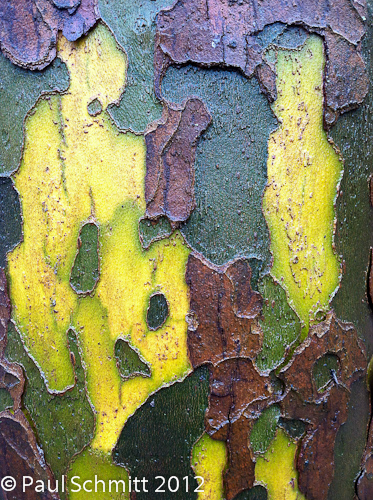
Here is my final image from when I was leaving clock tower area. Can you tell what it is?
Paul Schmitt
The change in my opinion began one afternoon when I was wandering through the herb garden at Cornell Plantations. The light was good, and I had been lazy. My DSLR was not with me. I decided to "play" with the iPhone camera just as when I experimented with a Holga toy camera. It had a single element, uncoated plastic lens. There were two aperture settings, one shutter speed and no meter. Basic. Very basic.
Now, the iPhone is a bit like the Holga too. There is one aperture, f/2.8. Since the lens is very wide angle, there is a large depth of field. Correct exposure is dependent on the automatic metering to set shutter speed. This makes for a good test of the photographer's basic skill set and understanding of wide angle photography.
My first images surprised me. Was this capable of more than snapshots? I immediately saw the first challenge, namely holding the iPhone so my fingers did not get into the image. In addition, I was so close to the subject that it was easy to shade the subjects. Those are good basic skills to keep in mind.
A next question to me was about the wider landscape image. Could I use the wide angle to show a perspective of flower beds and their surroundings?
I found the size of the iPhone made it easy to hold it in unusual positions and see the result on the image screen.
This image would have been better if I had a short stool to stand on, but I loved the color, and the instant review of the photo. The colors were looking pretty good too. This image was at 1/125 second and ISO 100, naturally at f/2.8. The previous image was at 1/120 second, ISO 80. I was surprised that the sensor ISO speed went down to 80.
So, I went looking for some more images. If you are photographer, you know how a few good images inspires a burst of creativity with no apparent sense of time passing.
The images kept coming as I awakened to the possibility of a creative camera that is so small and as ever present as a cell phone.
Parallel to this discovery was the delight I felt when I could pull the image I just made into a photo editing application, and make some simple adjustments. If you can remember shooting a roll of slide film, mailing it to a processor and waiting for the return mail some week later, then this is revolutionary beyond the initial digital revolution when you could download a memory card to your computer the same day and edit. Now you can do edit and email it to someone within minutes, and it can be a pretty good image.
Here is a good example of how the iPhone can capture an unexpected creative image. We were visiting our daughter in Washington, DC this autumn and with some unexpected time, headed across the Mall to see the new monument to Martin Luther King Jr.
In the interest of honesty, this is a digital composite. The sky was a dull and uniform grey, so the sky is added. My point is that I was able to capture the critical image data and create an artistic and reasonable image to express the feelings I had at this sculpture.
Just this past week, I was feeling cabin fever after a day of pouring rain, and went in search of images with both my iPhone and Canon G9 point and shoot. I wanted to compare the two cameras critically.
I think this is a pretty good image. It was made with the camera very low to the pavement in order to correctly position the reflections. Which camera would you expect to have created this landscape image?So, after deciding on the source of the landscape image, decide which camera likely made the portrait image at that follows. It is in the same light.
Well, the first image is from the iPhone. The tipping of the Corning clock tower and the bank building suggest a wide angle shot with the lens tipped upward. This causes keystoning. The second image uses a longer focal length to limit the portion of the scene in the image. There is less keystoning. The colors are pretty good in both with a slight edge on my screen to the G9, a very slight edge.
I asked the question whether the iPhone is capable of creative photograph, and I think the answer is a qualified yes. It works where wide angle distortions are not a problem. (Note that the one common complaint is that people's faces are distorted to look bloated and warped. That is to be expected from a wide angle lens.) I do think it is important to get close to a foreground element that can fill the image. Objects in the distance become very small and are lost to the viewer.
The simple truth is that the camera you have with you is better than the one you left at home. Another lesson is that a simple camera can yield creative results if you have learned how to use it to its potential. The iPhone camera is fully capable of creative images within its limits, and it is fun.
I have begun a gallery of iPhonography in my website and hope you will visit it at:
Natural World Photography by Paul Schmitt
Here is my final image from when I was leaving clock tower area. Can you tell what it is?
Paul Schmitt
Subscribe to:
Posts (Atom)